Where altcoin
liquidity sits
Track resting orders and liquidations across exchanges. Start with four free web tools, or explore the charts on iPhone.
Each exchange has
its own order book
A liquidation on Bybit won’t appear in Binance’s feed. If you’re following a price move, check which exchange reported the liquidations and where orders are sitting now.
A large buy order on one exchange may have no equivalent on another.
A price alert marks a level. Check the order book for orders near that level.
When a coin stands out in a screener, open its chart to see how the price moved.
Compare exchanges with the free P3 tools. When you need charts next to your screeners, open P3 Workspace with the same account.
Free tools and
P3 Workspace
Use the same web account for the free screeners and P3 Workspace. You’ll need P3 PRO to open Workspace.
Open Spy, Liq, Heat and Map after registering. There’s no trial to start and no card to add.
The P3 app for iPhone and iPad is the mobile product; App Store billing stays with your Apple ID.
P3 PRO adds the Workspace dashboard, proprietary indicators and the full alert set.
Four free tools
in your browser
Register with an email address. You won’t need a card or a subscription to use Spy, Liq, Heat and Map.
- 01 Spy Limit-order screener Find large resting limit orders and order-book walls across exchanges. Open Spy
- 02 Liq Liquidation screener One live feed of forced closes from Binance, Bybit, OKX, Gate.io and Hyperliquid. Open Liq
- 03 Heat Liquidity heatmap Pick a symbol and read its resting limit-order liquidity on price, with trade bubbles sized by trade value. Open Heat
- 04 Map Market map A market-wide view of where attention and volume are concentrating. Open Map
You can use these four tools without P3 PRO. The subscription adds Workspace, P3 indicators and alerts.
Large orders by exchange
Spy scans resting limit orders across venues and ranks them by size. The demo shows separate venue books feeding one wall list — not a single executable price ladder.
Open Spy DOMLocal samples, not live quotes. Spy screens resting orders; it does not route or execute them.
spy.p3p3.tech
Interactive demo · Illustrative data
Arrange charts and widgets
P3 PROPremium feature · subscribers only
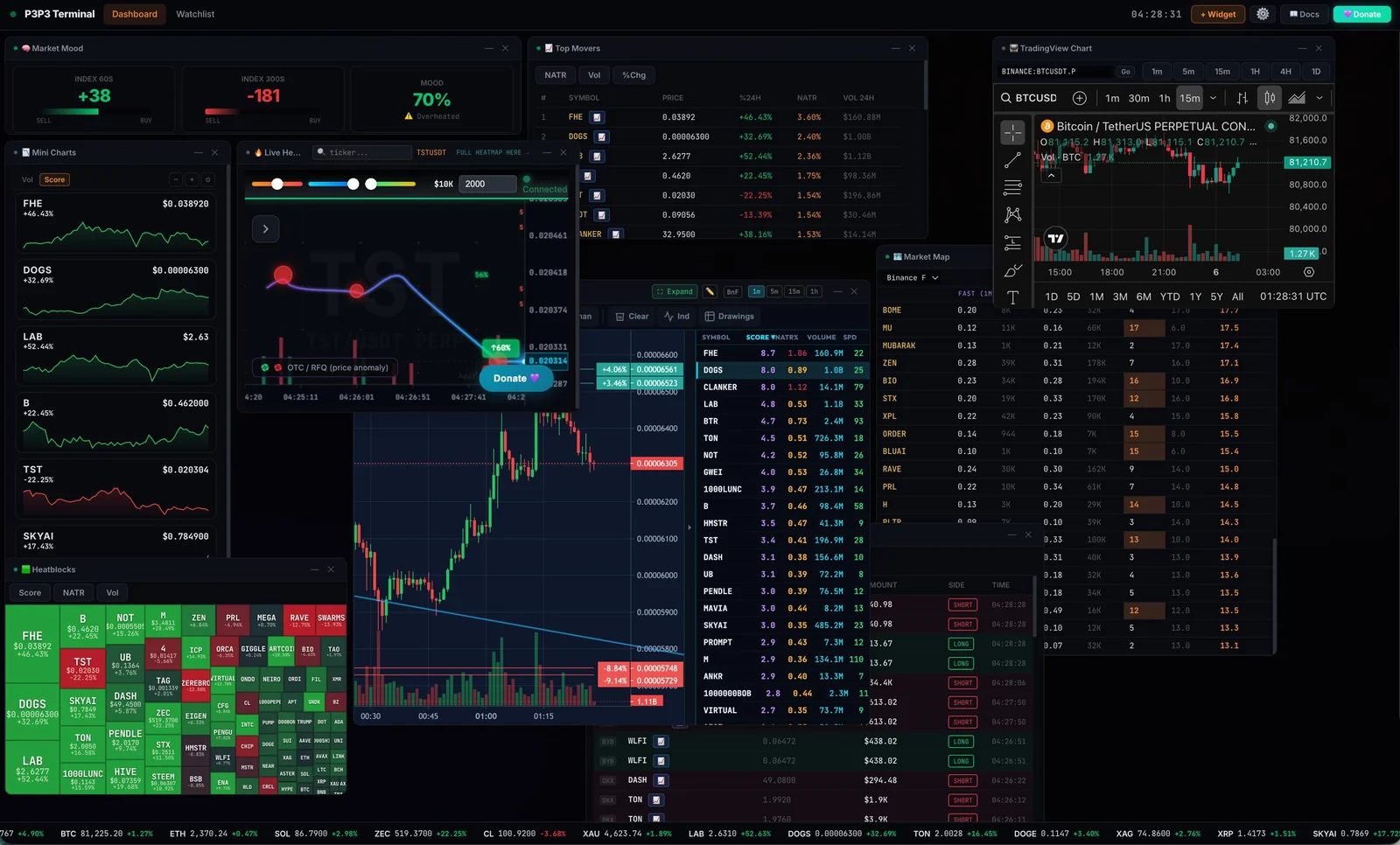
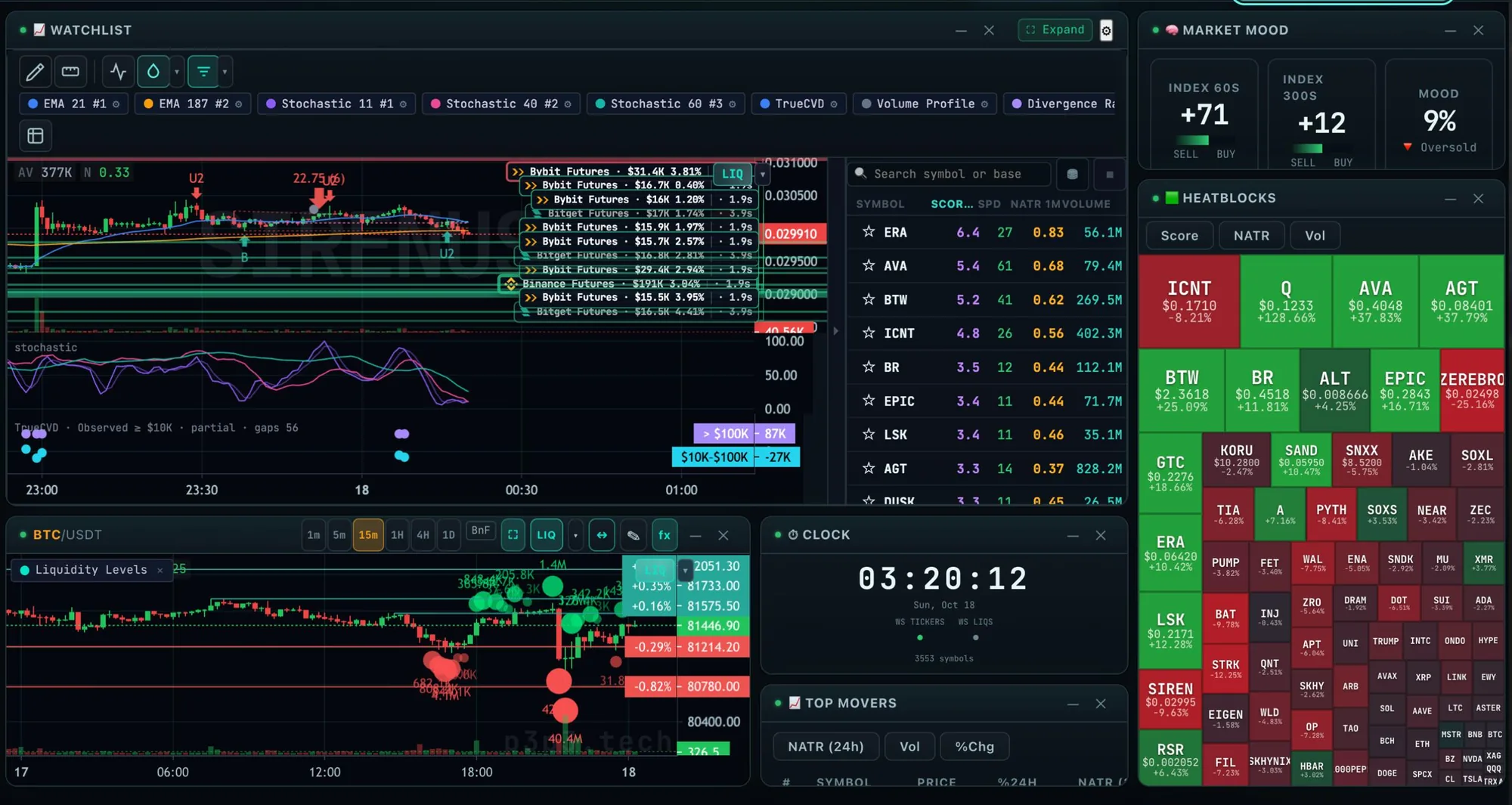
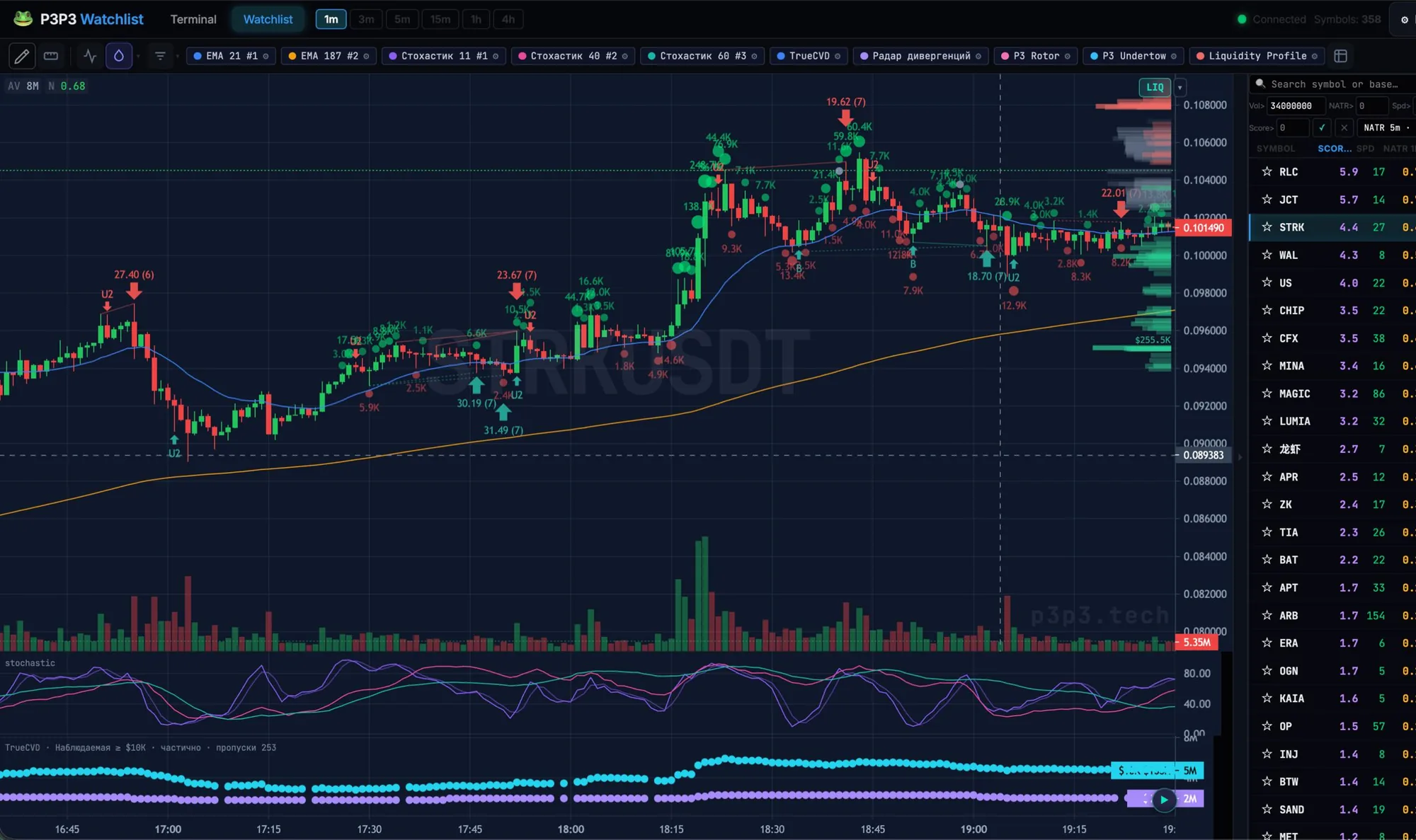
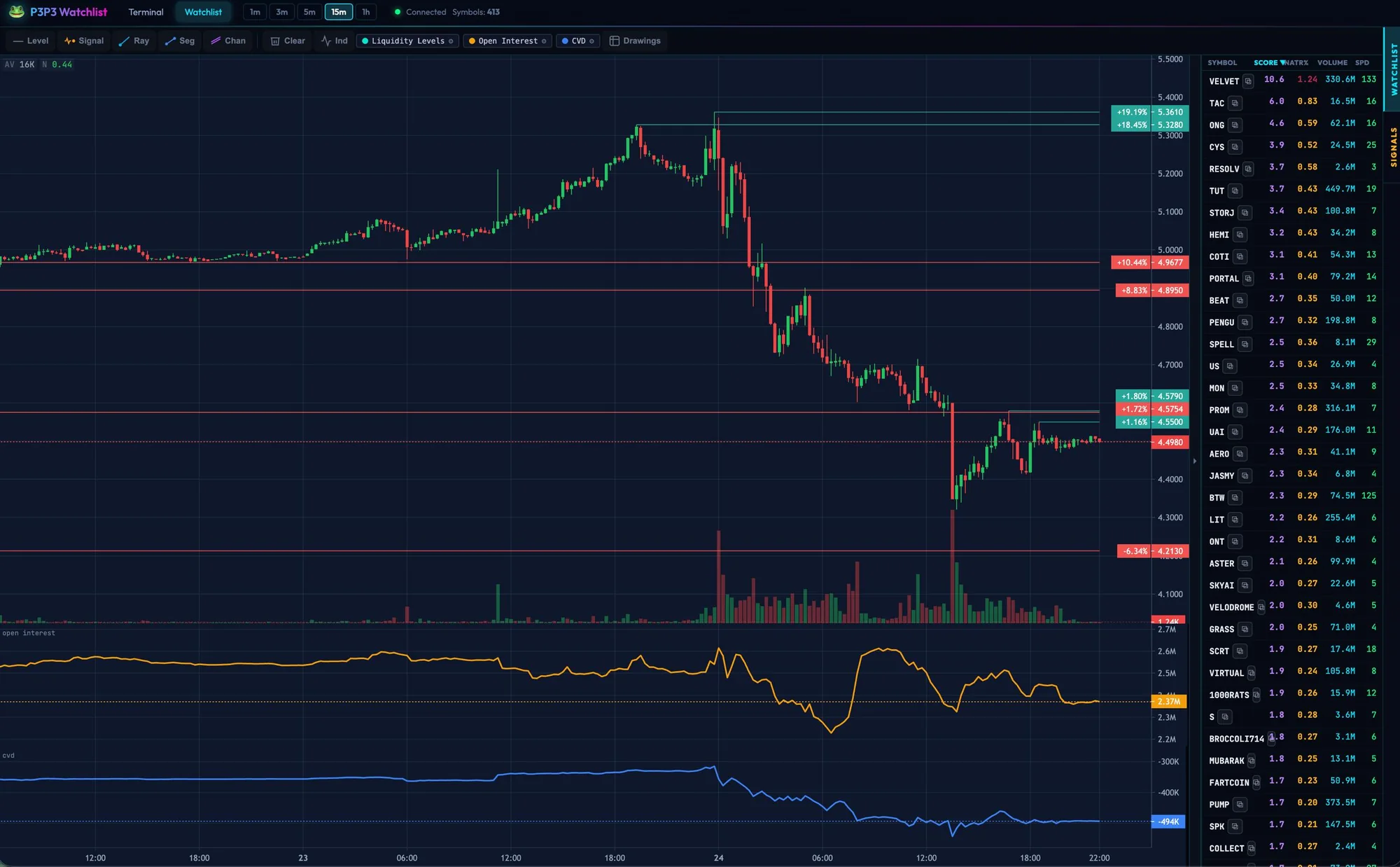
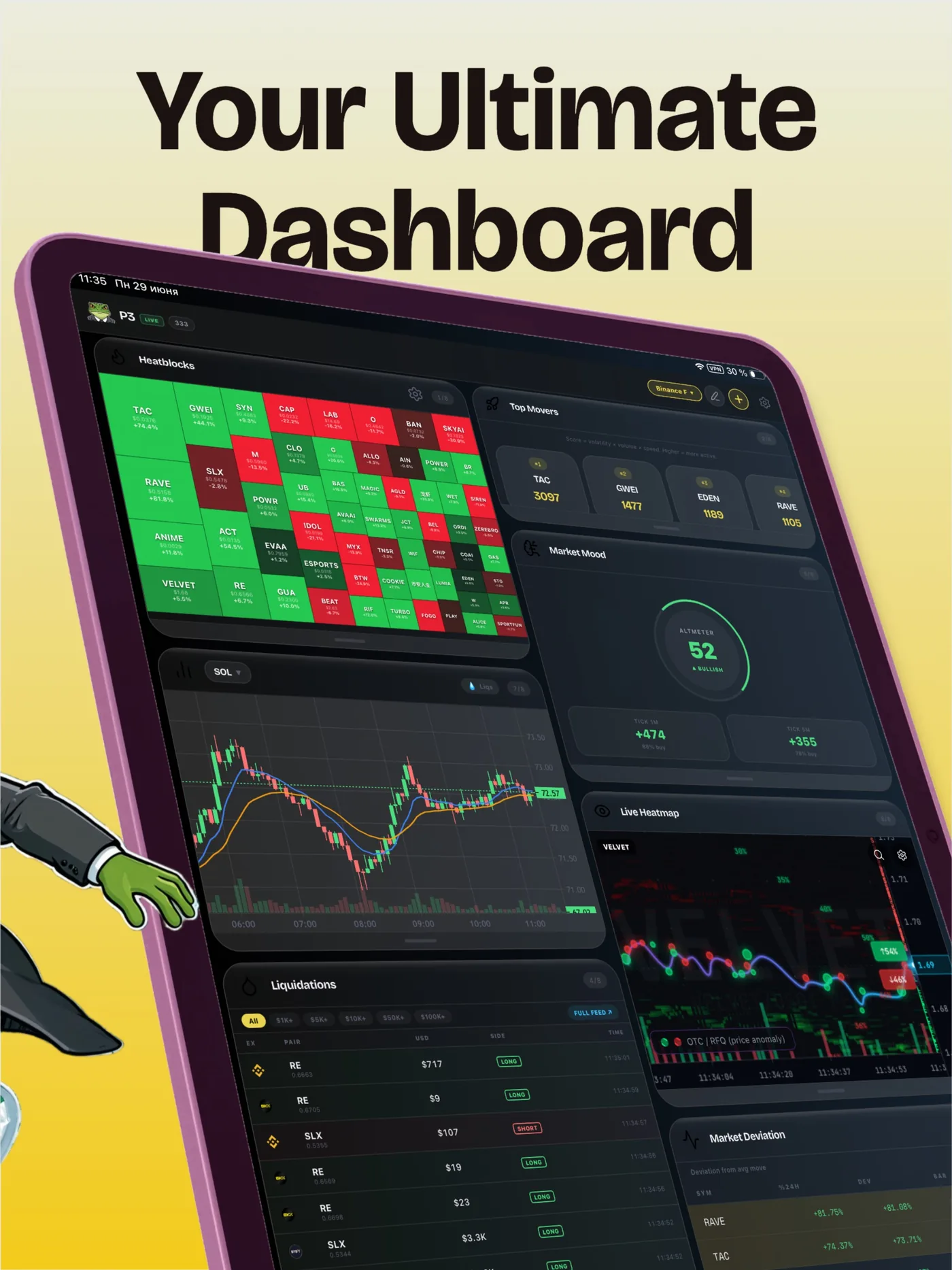
Put Watchlist next to a chart, then add the panels you use. P3 Workspace includes Market Mood, Top Movers, Mini Charts, Heatblocks, Market Map and live feeds. Resize the panels in your browser.
Open charts from your coin list
Select a ticker in Watchlist, Top Movers or Market Deviation. Open its chart and arrange the timeframes you want to compare.
Open desktop WatchlistP3 PRO includes the Workspace and Watchlist; web and App Store billing stay separate.
EMA, SMA, Bollinger Bands, Stochastic, pivot levels, Open Interest, CVD and Volume Profile — with reusable settings and multiple slots.
Give Stochastic, Open Interest and CVD the vertical space they need while the main chart stays aligned.
Place lines, rays, segments and channels; drag handles, edit style, duplicate, copy and paste across your workflow.
Keep symbols, market views and client-side alarms beside the charts you use to confirm them.
Pick a coin to open its chart
Switch symbols and the chart, volume and CVD follow. The demo cycles a few tickers on its own; pick one to take over.
Open desktop WatchlistLocal sample candles and CVD for illustration; no market data feed is connected.
P3 Watchlist
Interactive demo · Illustrative data
Indicators in
P3 Workspace
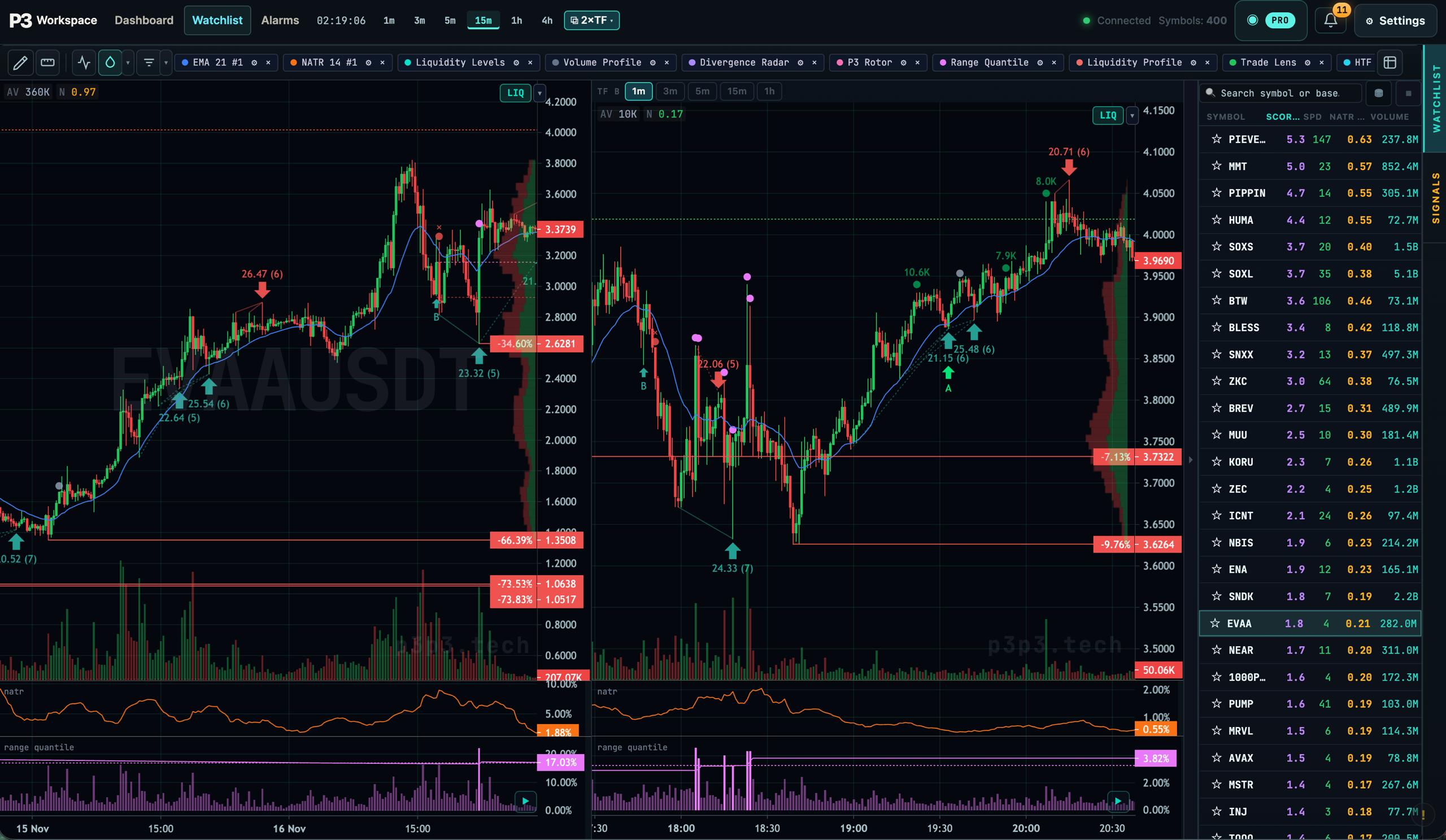
Rotor, Undertow and Divergence Radar are built into P3 Workspace. They describe market structure and momentum; they do not issue trade advice.
Rotor
Pullbacks inside a strong trend: A/B entries, the stop line and the R2 second entry.
Undertow
Three mean-reversion clues shown as U2/U3 setups, with an optional structure confirmation.
Divergence Radar
Checks seven momentum indicators, scores their agreement and never repaints a confirmed mark.
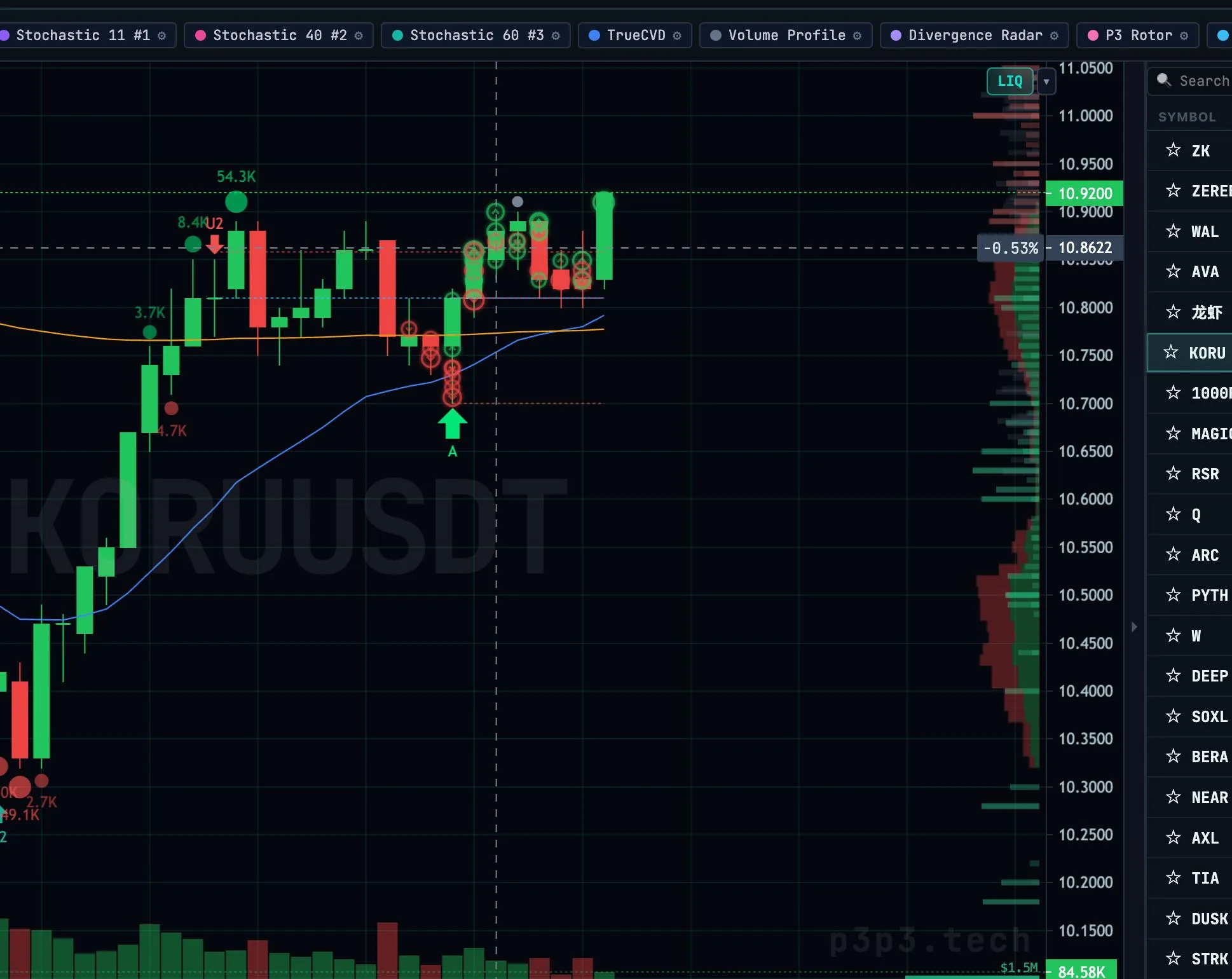
Indicators describe market structure — they are not trade advice. See P3 PRO plans
Nine smart signals
plus your own price levels.
P3 scans the market around the clock and sends a push notification when a configured condition is detected. Open the alert to inspect the ticker, trigger and chart context.
See P3 PRO plans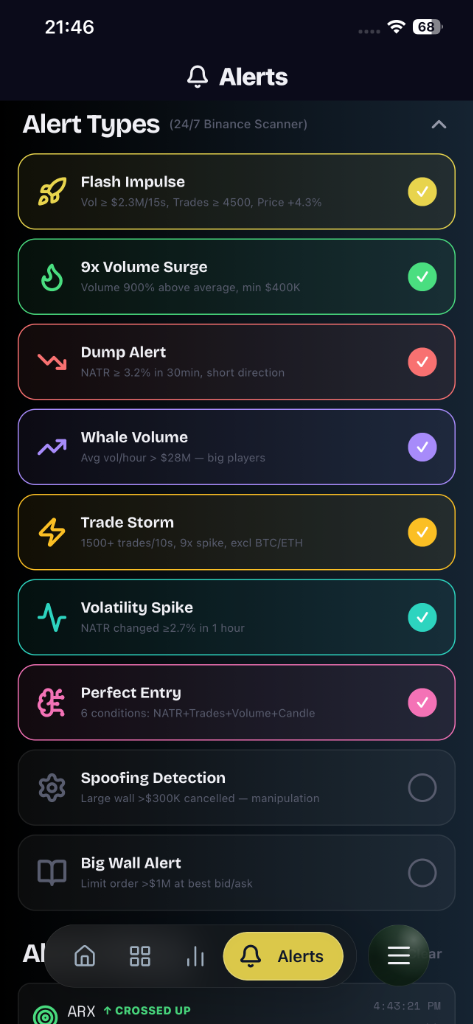
Inside the iPhone app
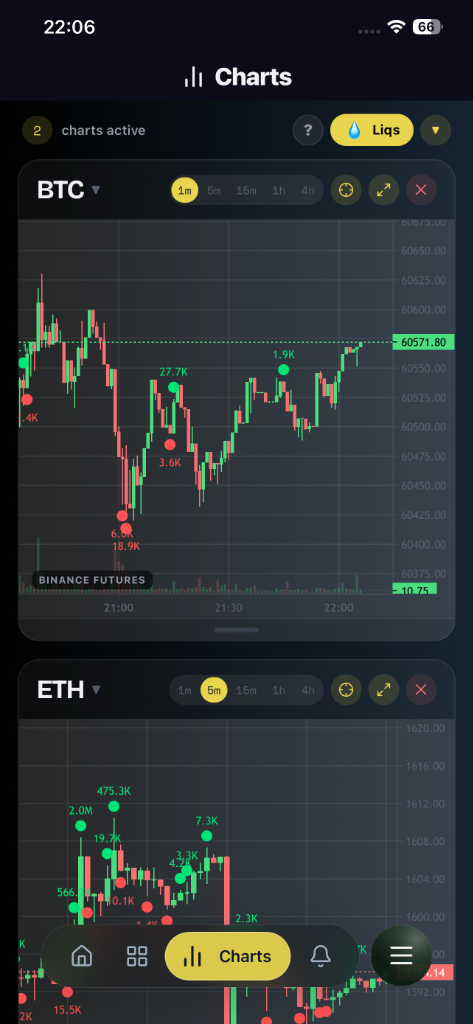
Six screens from the P3 iPhone app, including the market overview, liquidation feed and charts.
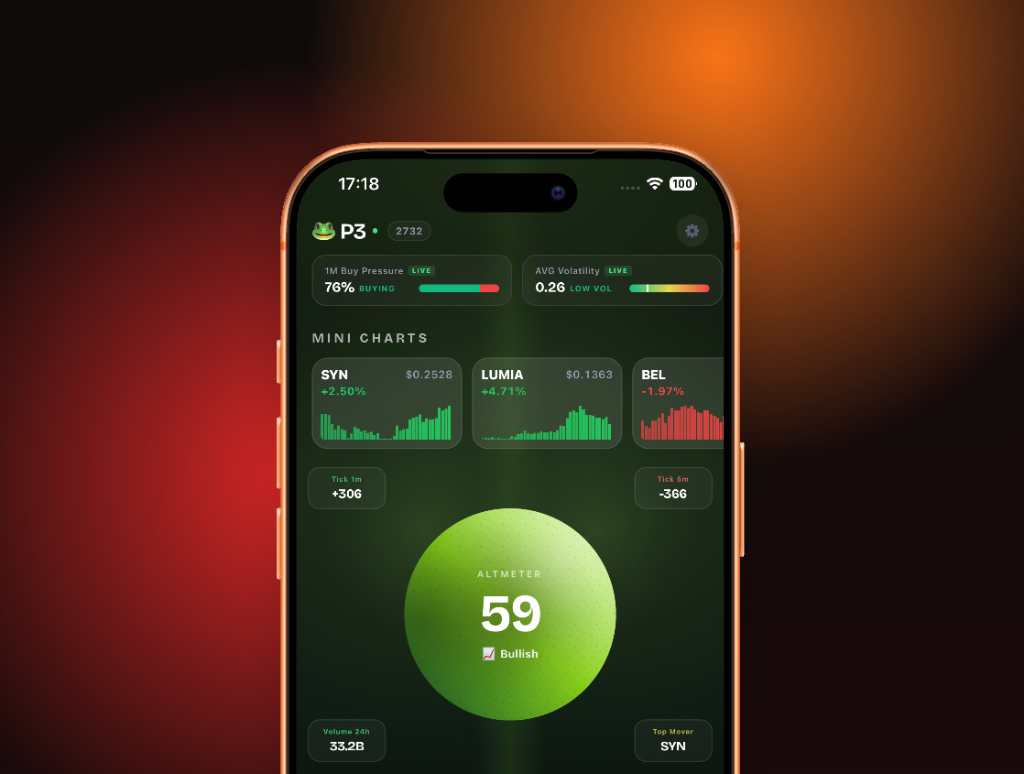
Altcoin market mood on a 0–100 scale
ALTMETER combines price action, order flow and volatility across tracked futures pairs into a single 0–100 reading. Use it to see whether conditions are bullish, bearish, overheated or in a broad sell-off without scanning hundreds of charts.
1-minute and 5-minute TICK indicators show net buying versus selling across 1,000+ pairs, updating in real time.
Average market volatility and rolling 24h volume tell you whether conditions favor trading — or sitting out.
Sparkline mini-charts plus an auto-surfaced Top Mover keep the hottest names a single tap away.
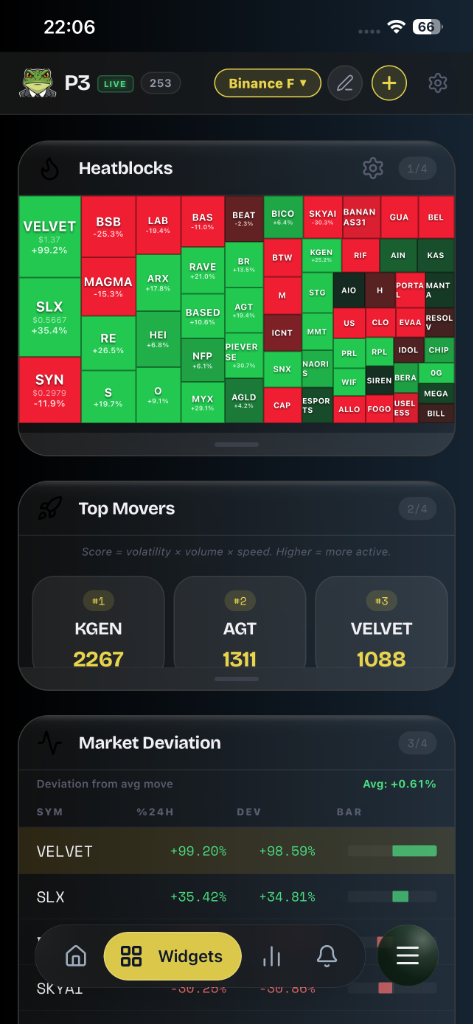
Choose which widgets to show
Arrange Heatblocks, Top Movers, Market Deviation and other widgets into your own workspace. See where activity is clustering and which coins lead or lag the broader move.
Tile size shows relative activity; color separates rising, falling and neutral coins.
Score = volatility × volume × speed. Higher values indicate stronger current activity.
Measure each coin's move against the market average and see what is running hot.
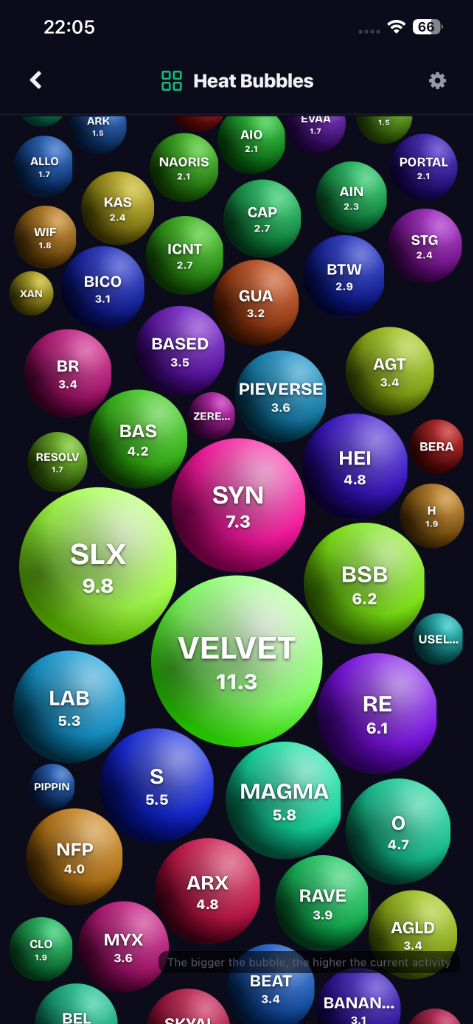
See activity build across the market.
Heat Bubbles maps live trading activity by size and direction. Larger bubbles mark stronger activity; color shows whether the move is positive or negative, so changes stand out without scanning a list.
Bubbles swell as trades and volume surge, so the names heating up grow before your eyes.
A green-to-red scale distinguishes positive and negative movement across the board.
Native rendering updates the view continuously with the live feed.
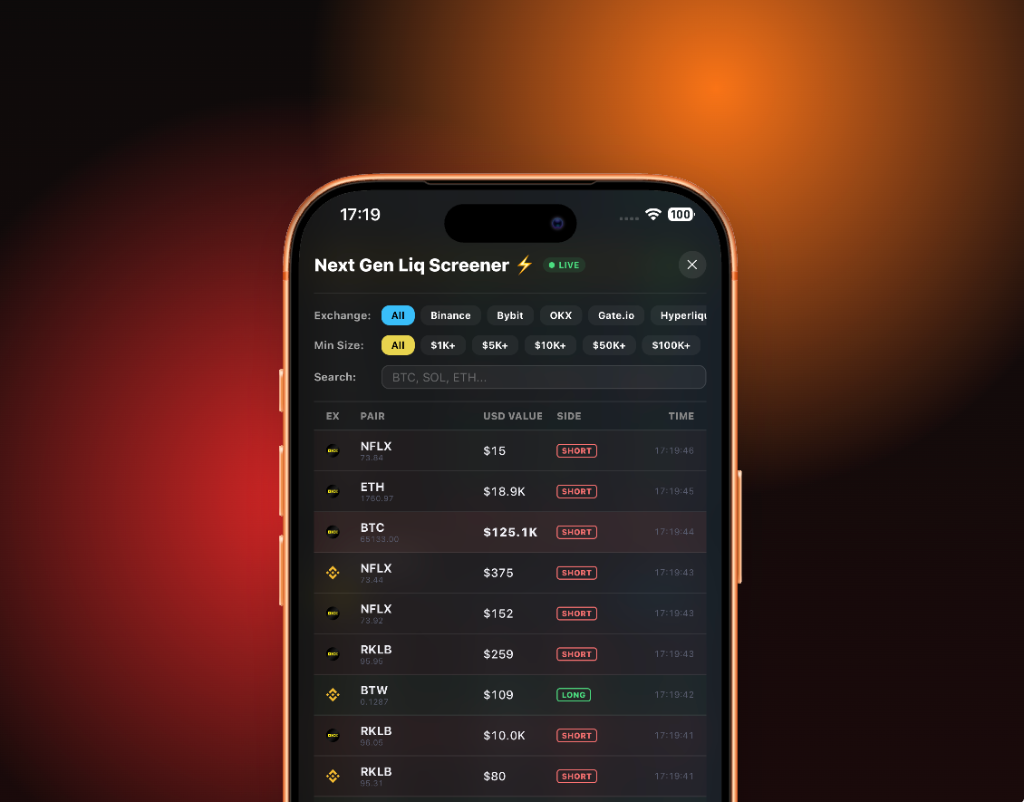
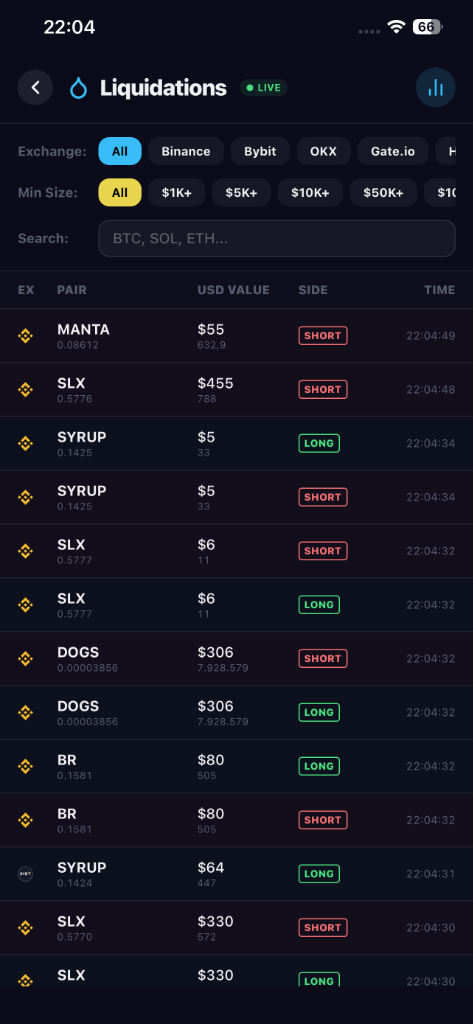
Five exchanges. One live liquidation feed.
The liquidation screener combines forced liquidations from Binance, Bybit, OKX, Gate.io and Hyperliquid in one feed. Filter from $1K to $100K+, search any ticker and follow clusters as they form.
One LIVE feed merges liquidations across all five venues, tagged by exchange, pair, USD value and side.
Snap to $1K / $5K / $10K / $50K / $100K+ thresholds or search a symbol.
Clusters of forced long or short closures highlight concentrated liquidation activity.
Compare order flow and order books
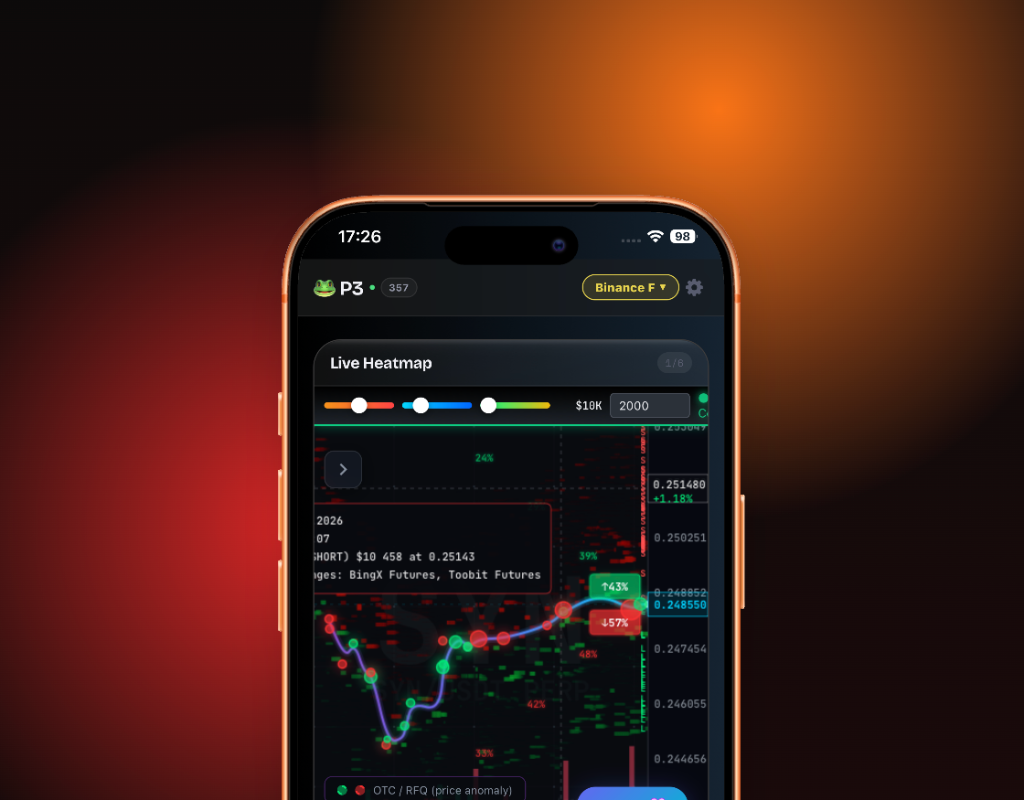
Live Heatmap compares order flow across 8 exchanges, while DOM Spy shows full depth-of-market across 20 venues. Track resting walls, fast cancellations and OTC/RFQ price anomalies before opening a chart.
Large bid and ask walls are compared across eight exchanges to show where resting liquidity is concentrated.
Rapidly cancelled walls, off-book OTC/RFQ prints and price anomalies are flagged for closer review.
The standalone depth-of-market view tracks order flow tick by tick across twenty exchanges.
Put alerts and liquidations directly on price.
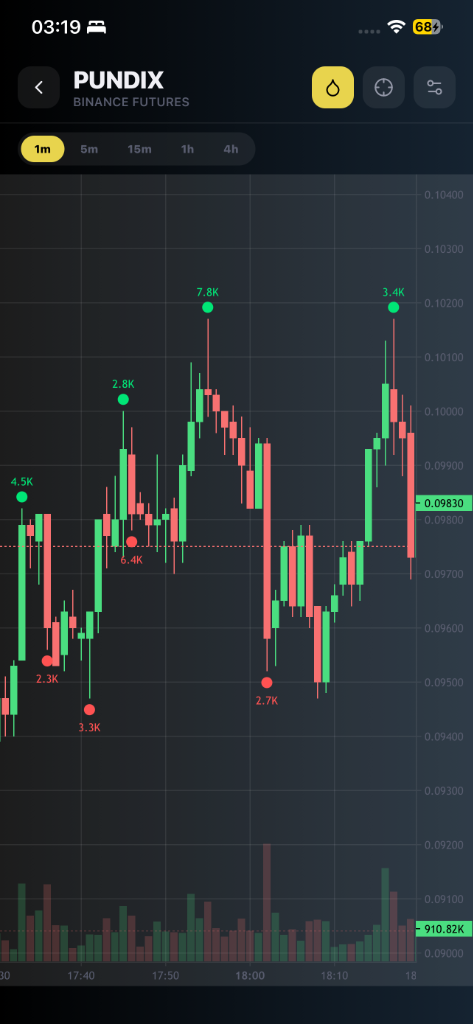
P3 charts place liquidation clusters, alert trigger points and volume directly on candles from 1m to 4h. Compare multiple symbols and timeframes, then review each signal in its full price context.
Green and red liquidation dots sit on the price, sized by value — context for every wick and reversal.
Tap any alert and the chart jumps to the exact candle where it fired.
Compare several symbols and timeframes at once with native rendering.
P3 for iPhone and iPad
Download P3 from the App Store. Apple handles billing for subscriptions bought in the app.
Official App Store screenshots, shown as published.
View P3 on the App Store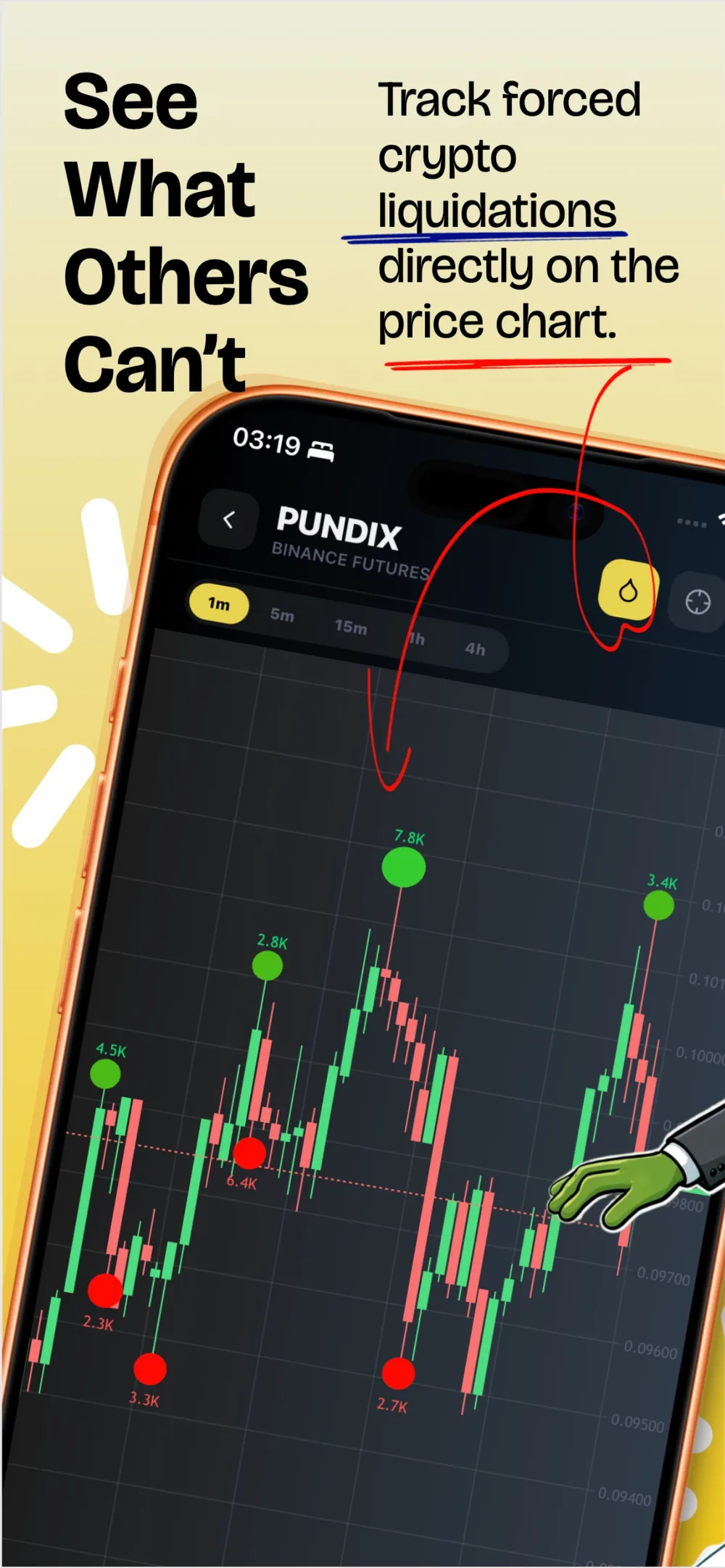
Exchange coverage by tool
Liq tracks 5 exchanges and Heat covers 8. In DOM Spy you can view order books from up to 20 venues.
The 20 venues powering DOM Spy order-flow coverage
Screenshots from the P3 app
How to review a market move
Use Score to narrow the market to coins showing meaningful activity.
Use ALTMETER to put each ticker in the context of the broader altcoin market.
Let P3 surface changes in volume, volatility, trade speed and order-book behaviour.
Open the ticker and review alerts and liquidation clusters against price.
What you get
with P3 PRO
With P3 PRO you can open Workspace, use the P3 indicators and configure alerts. The subscription helps pay for the servers and live data P3 uses to scan markets around the clock.
P3 PRO provides consistent access to the product's live-data features. New subscribers can evaluate P3 on live markets with the Annual trial.
What changed
in P3
Browse release notes for the iPhone app, P3 Workspace, p3p3.tech and the free tools.
-
P3 1.3.3: faster startup and Updates are back
Charts load progressively, and the in-app Updates section returns.
-
HTF Sweep CISD on the 1-minute chart
Mark confirmed sweeps and see simulated stop and target zones in Watchlist.
-
A closer look at the P3 tools
Larger product screenshots, including the original two-chart Watchlist view.
How to access
the web tools
Sign in at dash.p3p3.tech to use the web tools. For iPhone, download P3 Altcoin Spy from the App Store.
- 01Create a P3 account
Register with email and password at dash.p3p3.tech/account.html. No card is required for the free tools.
- 02Open Spy, Liq, Heat and Map
The four free web tools open from the same account. Use them without a subscription.
- 03Subscribe to P3 PRO where you prefer
Choose a plan on the web from your P3 account, or subscribe through the App Store on iPhone. Billing stays separate.
- 04Open P3 Workspace
Sign in at dash.p3p3.tech and open the Workspace dashboard: charts, Watchlist, DOM, CVD and the proprietary indicators.
One P3 account for the web: the four free tools and the Workspace. App Store billing and web billing are managed separately; web and App Store purchases are not fully linked yet. P3 is an analytical tool, not financial advice.
Professional tools.
One P3 PRO plan.
Start with four free tools. Add P3 PRO for the Workspace, proprietary indicators and alerts. Subscribe on the web from your account, or through the App Store on iPhone — billing stays separate.
Four web tools. No card required.
P3 Workspace dashboard, Rotor, Undertow and Divergence Radar, nine algorithmic alerts and custom price levels.
Subscribe on the web
See current web plans, prices and payment options in your P3 account. Checkout opens securely after sign-in.
- Unlimited widgets & up to 12 charts
- All 9 algorithmic alerts + custom price levels
- 5-second priority data refresh
- Full Liquidation Screener, Live Heatmap & DOM Spy
- P3 PRO access in the P3 Altcoin Spy app
- Same full P3 PRO access as Weekly
- 14-day Annual trial for new subscribers
- One annual payment
- 75% lower than weekly billing
Prices shown are for the US App Store and may vary by country, currency and applicable taxes.
Subscriptions auto-renew unless cancelled at least 24h before the period ends — manage anytime in your App Store account.
P3 is an analytical tool, not financial advice. Crypto trading carries significant risk.

P3 app and P3 Workspace are live.
Create a free account to use Spy, Liq, Heat and Map. Add P3 PRO for the Workspace dashboard, proprietary indicators and alerts. The Workspace runs on a P3 PRO subscription, with resizable widgets and advanced multi-chart analysis. P3 is live on iPhone; Android follows in October 2026.
Create free accountP3 on Telegram and X
Discuss the market in Telegram or follow P3 updates on X.